Server-side tagging moves tag execution from the visitor’s browser to a server container you control, which cuts the number of third-party scripts loading on the page and gives you a single checkpoint for privacy decisions. The result is a faster site, cleaner first-party data, and more consistent signals for analytics and ad bidding. Teams usually choose between automatic provisioning on Google Cloud Platform or a manual deployment on their own infrastructure.
TL;DR:
- Map a custom subdomain and install the server side Conversion Linker to preserve first party cookies and click IDs when browsers block third party cookies.
- Consent parameters must reach the server container before any configuration or event command fires; otherwise, data may pass before consent is captured.
- Use Cloud Run automatic provisioning for a proof of concept, but add redundant instances, monitor latency and errors, and test capacity before production traffic.
- Move analytics and conversion tags first, keep lower risk tools client side, and compare event counts for a few days before retiring old tags.
In a standard client-side setup, every tag (analytics, ads, heatmaps) runs as JavaScript in the visitor’s browser, each one making its own network call. Server-side tagging changes that flow: the browser sends one request to your web container, which forwards the data to a server container you host, and that server container distributes the data to its final destinations.
Google’s own documentation on server-side tagging describes this as processing data on a server instead of in the browser, which improves both performance and security. The server container runs clients, small pieces of logic that interpret incoming requests, the way a GA4 client parses a Measurement Protocol hit before passing it along.
The practical difference shows up in where cookies live:
A typical GA4 implementation through a server container follows a predictable sequence. Mapping it out helps you see exactly where each configuration decision fits.
Each of these steps is configured once in the server container’s client and tag settings, then applies to every matching request afterward.
The gains from server-side tagging cluster around three areas. Page speed tends to improve because the browser makes fewer third-party network calls and runs less JavaScript, since much of that work now happens server-side instead of in the user’s device.
Privacy controls get stronger too:
Server-side tagging processes data on a server instead of in the browser, which Google’s documentation ties directly to improved performance and security. That shift also tends to preserve more complete conversion signals, since server-side processing is less exposed to ad blockers and browser restrictions that strip client-side identifiers before they ever reach your analytics or ad platforms.
Getting a working tagging server does not require a long buildout. Google’s own guidance treats automatic provisioning on GCP as the fastest path for testing, using Cloud Run to host the container without manual server management. Manual deployment on your own infrastructure gives more control but takes longer to configure and maintain.
A practical rollout looks like this:
Pro Tip: Keep your old client-side tags running in parallel for a few days after cutover so you can compare event counts before fully retiring them.
Server-side tagging does not replace a consent management platform. According to Google’s consent mode documentation for server-side Tag Manager, the web container or CMP has to capture consent first and then pass consent parameters along to the server container, where consent-aware tags adjust what they process.
Consent mode comes in two forms, and the difference matters for what you can measure. Per Google’s consent mode overview, basic and advanced implementations differ in whether tags load at all when consent is denied and in how much modeled data remains available. Tags with built-in consent checks, such as ad_storage and analytics_storage, send cookieless measurement pings for modeling rather than writing identifiers when a visitor declines.
A short checklist keeps this working correctly:
Automatic provisioning on Cloud Run is a solid starting point, but Google’s own guidance is clear that default settings are meant for testing, not sustained production traffic. Before go-live, add instances for redundancy and size them to your expected volume.
Three factors drive recurring costs: the number of warm instances kept running to avoid cold starts, data egress as requests leave the container, and logging or monitoring overhead. Plan for at least minimal redundancy from day one, set up alerting on error rates and latency, and run a capacity test before any high-traffic event like a product launch or seasonal campaign.
A short pre-launch pass catches most problems before they reach production traffic.
When something breaks, the usual suspects are blocked requests from an ad blocker that still recognizes your subdomain pattern, missing cookies because the subdomain mapping was skipped, or a misconfigured client that is parsing the wrong event format. Triage in that order: check the request first, then the cookie, then the client logic.
Pro Tip: Watch real-user performance metrics for a full week after rollout, since caching and CDN behavior can mask early-stage server response issues.
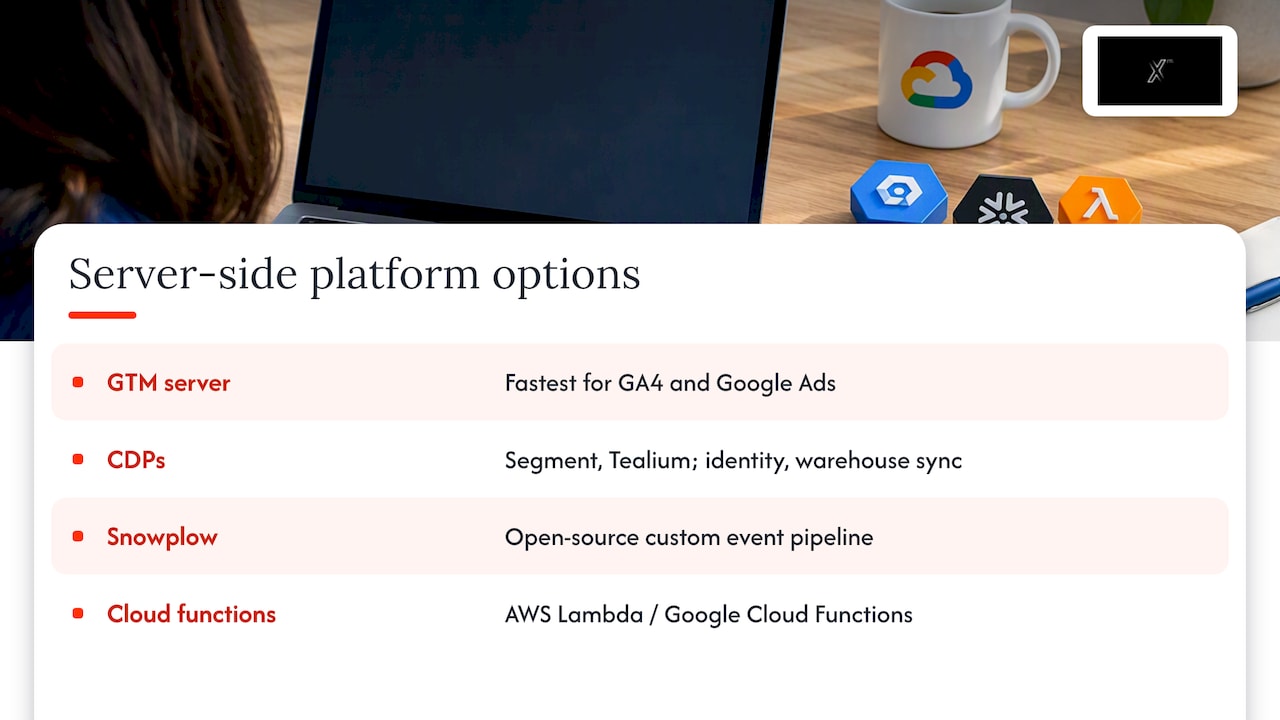
Google Tag Manager’s server container is the most widely documented option, but it is not the only route to server-side tagging. Several commercial customer data platforms, including Segment and Tealium, offer their own server-side event collection and routing layers that compete directly with a self-managed GTM server container, often bundling identity resolution and warehouse syncing on top. Snowplow takes a different approach, offering an open-source pipeline for teams that want to build custom event collection rather than route through a vendor’s managed infrastructure.
Cloud-native teams sometimes skip a dedicated tagging platform entirely and build their own ingestion endpoint on AWS Lambda or Google Cloud Functions, forwarding events to a data warehouse and then to ad platforms through their respective APIs. This path gives maximum control but requires ongoing engineering investment that a managed server container avoids.
The right choice depends on how much engineering capacity you have and how deeply you need to customize event processing. A marketing team running GA4 and Google Ads will usually find the GTM server container the fastest path to the benefits described in Google’s documentation, since it integrates directly with tools already in use. Teams with more complex, multi-destination data needs may lean toward a customer data platform or a custom pipeline instead, trading setup speed for flexibility.
Client-side tagging is simpler to set up: tags run directly in the browser with no server to maintain, which is why most sites still start there. The tradeoff is that every tag is exposed to ad blockers, browser tracking protections, and the user’s own network conditions, all of which can silently drop data before it reaches your analytics.
Server-side tagging shifts that work to infrastructure you control. Requests go to your own first-party subdomain first, which is less likely to be blocked outright, and the server decides what to forward and when, including honoring consent signals before anything reaches a third party. The cost is operational: you now own a server container that needs provisioning, monitoring, and occasional scaling decisions, as Google’s deployment guidance makes clear when it recommends adding instances for redundancy before going live.
In practice, the choice is not strictly either-or. Most teams that adopt server-side tagging keep client-side tags for lower-stakes tools like heatmaps or session recordings, while routing analytics and ad conversion tags, the ones most sensitive to data loss and privacy rules, through the server container. That split captures most of the performance and privacy benefit without requiring a full migration on day one.
Running your own server container means you are now responsible for securing an endpoint that handles visitor data, which is a different risk profile than letting third-party scripts run in the browser. Treat the tagging server subdomain like any other production endpoint: restrict administrative access, rotate credentials for connected service accounts, and avoid exposing the container’s debug or preview endpoints to the public internet.
Because the server container now holds first-party cookies and, often, personally identifiable click identifiers, access logging matters more than it does in a pure client-side setup. Monitor who has permission to edit the container configuration in Google Tag Manager, since a misconfigured tag there can expose or mishandle data for every visitor at once rather than just one browser session.
Consent handling is itself a security practice, not just a compliance checkbox. Following Google’s consent mode guidance for passing consent parameters correctly ensures that data your server processes actually matches what the visitor agreed to, which limits your exposure if that processing is ever reviewed. Finally, keep the server environment patched and scoped: a Cloud Run or custom deployment should run with the minimum permissions needed to receive, process, and forward events, nothing broader.
Server-side tagging pays off fastest when ad spend is significant, conversion values are high, or privacy rules demand first-party data handling. Below that threshold, the setup and monitoring effort can outweigh the gain. We approach these projects by scoping the data architecture first, then handling implementation and consent integration, with ongoing monitoring built into the handoff.
— Xpert
We help you turn a server container from a technical checklist into a measurement system that actually improves your data quality and ad performance. Our Web, Tech & Innovation team scopes the deployment, configures consent integration, and connects the resulting data back into your digital marketing campaigns so bidding and reporting both benefit.

If you want a clear plan for your own setup, from provisioning decisions to consent configuration, start with our services overview and tell us where your current tracking is falling short.
Server-side tags are tag configurations that run inside a server container you host rather than in the visitor’s browser, processing and forwarding data to destinations like GA4 or ad platforms. This setup is commonly built with Google Tag Manager’s server container, which also handles things like cookie management and consent checks before data leaves your infrastructure.
No, server-side tagging is not required to run analytics or ad campaigns; client-side tagging remains a valid and simpler option for many sites. Teams typically adopt it when privacy requirements, ad blocker exposure, or data quality needs justify the added setup and maintenance.
Server-side tagging works alongside consent mode rather than replacing it: your web container or CMP still captures the visitor’s consent choice and passes those signals to the server container. From there, consent-aware tags in the server container adjust what gets processed, using either basic or advanced consent mode depending on how much modeled data you need when consent is denied.
Server-side tracking helps recover data that ad blockers and browser restrictions would otherwise strip from client-side tags, since requests route through a first-party subdomain instead of directly to third-party domains. It also centralizes consent handling in one place, which Google’s own documentation ties to measurable gains in both performance and security.
Hi! Tell us about your business and what you need, and we will reply on WhatsApp.
Fill in the form and our team will get back to you shortly.