
Server Side Tagging: 7 GA4 Steps, Consent, GCP or Manual Setup
Server-side tagging moves tag execution from the visitor’s browser to a server container you control, which cuts the number of third-party scripts loading on the page and gives you a single checkpoint for privacy decisions. The result is a faster site, cleaner first-party data, and more consistent signals for analytics and ad bidding. Teams usually choose between automatic provisioning on Google Cloud Platform or a manual deployment on their own infrastructure.
TL;DR:
- Map a custom subdomain and install the server side Conversion Linker to preserve first party cookies and click IDs when browsers block third party cookies.
- Consent parameters must reach the server container before any configuration or event command fires; otherwise, data may pass before consent is captured.
- Use Cloud Run automatic provisioning for a proof of concept, but add redundant instances, monitor latency and errors, and test capacity before production traffic.
- Move analytics and conversion tags first, keep lower risk tools client side, and compare event counts for a few days before retiring old tags.
Sommaire
- What server-side tagging is: architecture and core components
- How server-side tagging works in practice: a request flow example
- Benefits: performance, privacy controls, and better data quality
- Quick start: GCP automatic provisioning vs manual deployment
- Consent mode and privacy integration with server-side tagging
- Deployment and operational considerations: scaling, costs, and reliability
- Implementation checklist and troubleshooting common issues
- Server-side tagging platforms and tools beyond Google Tag Manager
- Server-side tagging vs. client-side tagging: pros and cons
- Security implications and best practices for server-side tagging
- Xpert Marketing’s view on when server-side tagging is worth the investment
- How our team supports your server-side tagging project
- FAQ
- Sources
What server-side tagging is: architecture and core components
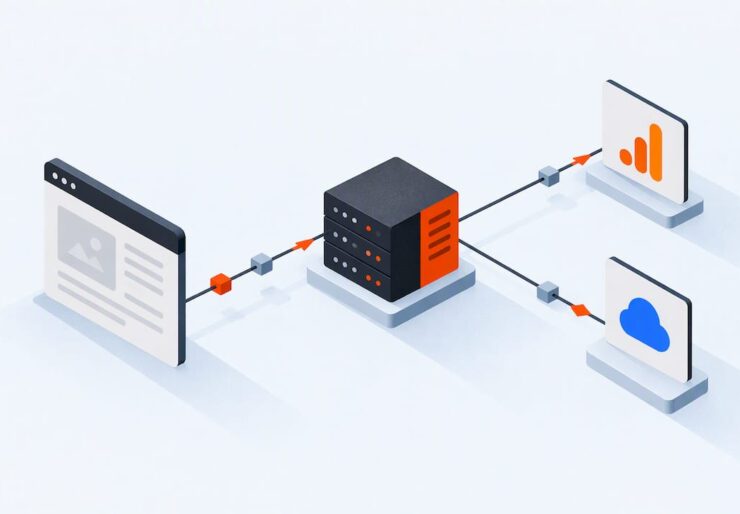
In a standard client-side setup, every tag (analytics, ads, heatmaps) runs as JavaScript in the visitor’s browser, each one making its own network call. Server-side tagging changes that flow: the browser sends one request to your web container, which forwards the data to a server container you host, and that server container distributes the data to its final destinations.
Google’s own documentation on server-side tagging describes this as processing data on a server instead of in the browser, which improves both performance and security. The server container runs clients, small pieces of logic that interpret incoming requests, the way a GA4 client parses a Measurement Protocol hit before passing it along.
The practical difference shows up in where cookies live:
- Client-side tagging sets cookies through the browser, often flagged as third-party by browsers and ad blockers.
- Server-side tagging, paired with a custom subdomain, lets the server read and write cookies in a first-party context.
- First-party cookies set this way can also carry the HttpOnly flag, which blocks client-side scripts from reading them.
How server-side tagging works in practice: a request flow example
A typical GA4 implementation through a server container follows a predictable sequence. Mapping it out helps you see exactly where each configuration decision fits.
- The browser loads gtag.js, which fires a hit to your tagging server’s custom subdomain instead of directly to Google’s servers.
- The web container (or your site’s Tag Manager setup) sends the event payload to the server container over HTTPS.
- The server container’s GA4 client receives the request, parses the event, and prepares it for forwarding.
- A conversion linker tag, run server-side, captures click IDs and stores them in a first-party cookie so attribution survives even when third-party cookies are blocked.
- The server container forwards the processed event to GA4, Google Ads, or any other configured destination.
- Optional URL passthrough settings let click identifiers travel in the URL instead of a cookie when cookie storage is restricted.
- Ads data redaction options, when enabled, strip or limit certain identifiers before the request leaves the server container, which matters in regions with stricter ad personalization rules.
Each of these steps is configured once in the server container’s client and tag settings, then applies to every matching request afterward.
Benefits: performance, privacy controls, and better data quality
The gains from server-side tagging cluster around three areas. Page speed tends to improve because the browser makes fewer third-party network calls and runs less JavaScript, since much of that work now happens server-side instead of in the user’s device.
Privacy controls get stronger too:
- First-party cookies set from your own subdomain are more durable than third-party ones.
- HttpOnly cookies prevent client-side scripts, including malicious ones, from reading stored identifiers.
- Consent-aware tags in the server container can adjust what gets processed before any data leaves your infrastructure.
Server-side tagging processes data on a server instead of in the browser, which Google’s documentation ties directly to improved performance and security. That shift also tends to preserve more complete conversion signals, since server-side processing is less exposed to ad blockers and browser restrictions that strip client-side identifiers before they ever reach your analytics or ad platforms.
Quick start: GCP automatic provisioning vs manual deployment
Getting a working tagging server does not require a long buildout. Google’s own guidance treats automatic provisioning on GCP as the fastest path for testing, using Cloud Run to host the container without manual server management. Manual deployment on your own infrastructure gives more control but takes longer to configure and maintain.
A practical rollout looks like this:
- Create a server container in Google Tag Manager and choose automatic provisioning for a quick proof of concept, or manual deployment if you need a different hosting environment.
- Map a custom subdomain (like metrics.yoursite.com) to the tagging server so cookies are set in a first-party context and survive longer than third-party alternatives.
- Add the GA4 client to receive and parse incoming events.
- Install the conversion linker tag to preserve click IDs for attribution.
- Use preview and debug mode to confirm requests arrive correctly before moving any production traffic.
- Shift tags over gradually, starting with lower-risk ones, while monitoring that data still matches your client-side baseline.
Conseil : Keep your old client-side tags running in parallel for a few days after cutover so you can compare event counts before fully retiring them.

Consent mode and privacy integration with server-side tagging
Server-side tagging does not replace a consent management platform. According to Google’s consent mode documentation for server-side Tag Manager, the web container or CMP has to capture consent first and then pass consent parameters along to the server container, where consent-aware tags adjust what they process.
Consent mode comes in two forms, and the difference matters for what you can measure. Per Google’s consent mode overview, basic and advanced implementations differ in whether tags load at all when consent is denied and in how much modeled data remains available. Tags with built-in consent checks, such as ad_storage and analytics_storage, send cookieless measurement pings for modeling rather than writing identifiers when a visitor declines.
A short checklist keeps this working correctly:
- Confirm consent signals leave the web container before any config or event command fires, since Google’s setup guide notes that ordering mistakes can let data through before consent is captured.
- Enable URL passthrough so attribution data can travel without cookies when consent is restricted.
- Install the Conversion Linker tag in the server container, not just the web container.
Deployment and operational considerations: scaling, costs, and reliability
Automatic provisioning on Cloud Run is a solid starting point, but Google’s own guidance is clear that default settings are meant for testing, not sustained production traffic. Before go-live, add instances for redundancy and size them to your expected volume.
Three factors drive recurring costs: the number of warm instances kept running to avoid cold starts, data egress as requests leave the container, and logging or monitoring overhead. Plan for at least minimal redundancy from day one, set up alerting on error rates and latency, and run a capacity test before any high-traffic event like a product launch or seasonal campaign.
Implementation checklist and troubleshooting common issues
A short pre-launch pass catches most problems before they reach production traffic.
- Run preview mode and send a real test event to confirm the server container receives it.
- Check that consent parameters are actually arriving with each request, not just configured in theory.
- Verify the cookie domain matches your custom subdomain, not a default Google domain.
- Compare event counts between your old client-side setup and the new server-side one for at least a few days.
When something breaks, the usual suspects are blocked requests from an ad blocker that still recognizes your subdomain pattern, missing cookies because the subdomain mapping was skipped, or a misconfigured client that is parsing the wrong event format. Triage in that order: check the request first, then the cookie, then the client logic.
Conseil : Watch real-user performance metrics for a full week after rollout, since caching and CDN behavior can mask early-stage server response issues.
Server-side tagging platforms and tools beyond Google Tag Manager
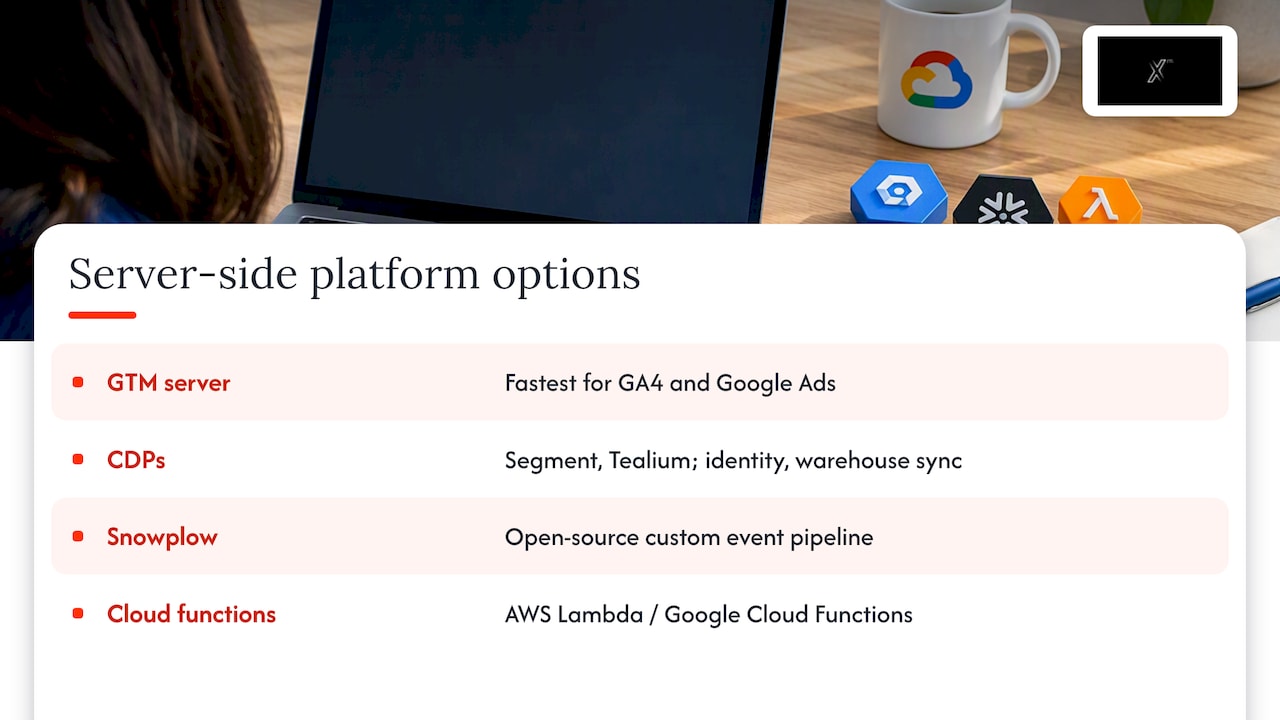
Google Tag Manager’s server container is the most widely documented option, but it is not the only route to server-side tagging. Several commercial customer data platforms, including Segment and Tealium, offer their own server-side event collection and routing layers that compete directly with a self-managed GTM server container, often bundling identity resolution and warehouse syncing on top. Snowplow takes a different approach, offering an open-source pipeline for teams that want to build custom event collection rather than route through a vendor’s managed infrastructure.
Cloud-native teams sometimes skip a dedicated tagging platform entirely and build their own ingestion endpoint on AWS Lambda or Google Cloud Functions, forwarding events to a data warehouse and then to ad platforms through their respective APIs. This path gives maximum control but requires ongoing engineering investment that a managed server container avoids.
The right choice depends on how much engineering capacity you have and how deeply you need to customize event processing. A marketing team running GA4 and Google Ads will usually find the GTM server container the fastest path to the benefits described in Google’s documentation, since it integrates directly with tools already in use. Teams with more complex, multi-destination data needs may lean toward a customer data platform or a custom pipeline instead, trading setup speed for flexibility.
Server-side tagging vs. client-side tagging: pros and cons
Client-side tagging is simpler to set up: tags run directly in the browser with no server to maintain, which is why most sites still start there. The tradeoff is that every tag is exposed to ad blockers, browser tracking protections, and the user’s own network conditions, all of which can silently drop data before it reaches your analytics.
Server-side tagging shifts that work to infrastructure you control. Requests go to your own first-party subdomain first, which is less likely to be blocked outright, and the server decides what to forward and when, including honoring consent signals before anything reaches a third party. The cost is operational: you now own a server container that needs provisioning, monitoring, and occasional scaling decisions, as Google’s deployment guidance makes clear when it recommends adding instances for redundancy before going live.
In practice, the choice is not strictly either-or. Most teams that adopt server-side tagging keep client-side tags for lower-stakes tools like heatmaps or session recordings, while routing analytics and ad conversion tags, the ones most sensitive to data loss and privacy rules, through the server container. That split captures most of the performance and privacy benefit without requiring a full migration on day one.
Security implications and best practices for server-side tagging
Running your own server container means you are now responsible for securing an endpoint that handles visitor data, which is a different risk profile than letting third-party scripts run in the browser. Treat the tagging server subdomain like any other production endpoint: restrict administrative access, rotate credentials for connected service accounts, and avoid exposing the container’s debug or preview endpoints to the public internet.
Because the server container now holds first-party cookies and, often, personally identifiable click identifiers, access logging matters more than it does in a pure client-side setup. Monitor who has permission to edit the container configuration in Google Tag Manager, since a misconfigured tag there can expose or mishandle data for every visitor at once rather than just one browser session.
Consent handling is itself a security practice, not just a compliance checkbox. Following Google’s consent mode guidance for passing consent parameters correctly ensures that data your server processes actually matches what the visitor agreed to, which limits your exposure if that processing is ever reviewed. Finally, keep the server environment patched and scoped: a Cloud Run or custom deployment should run with the minimum permissions needed to receive, process, and forward events, nothing broader.
Xpert Marketing’s view on when server-side tagging is worth the investment
Server-side tagging pays off fastest when ad spend is significant, conversion values are high, or privacy rules demand first-party data handling. Below that threshold, the setup and monitoring effort can outweigh the gain. We approach these projects by scoping the data architecture first, then handling implementation and consent integration, with ongoing monitoring built into the handoff.
— Xpert
How our team supports your server-side tagging project
We help you turn a server container from a technical checklist into a measurement system that actually improves your data quality and ad performance. Our Web, Technologie & Innovation team scopes the deployment, configures consent integration, and connects the resulting data back into your digital marketing campaigns so bidding and reporting both benefit.

If you want a clear plan for your own setup, from provisioning decisions to consent configuration, start with our services overview and tell us where your current tracking is falling short.
FAQ
What are server-side tags?
Server-side tags are tag configurations that run inside a server container you host rather than in the visitor’s browser, processing and forwarding data to destinations like GA4 or ad platforms. This setup is commonly built with Google Tag Manager’s server container, which also handles things like cookie management and consent checks before data leaves your infrastructure.
Is server-side tagging mandatory?
No, server-side tagging is not required to run analytics or ad campaigns; client-side tagging remains a valid and simpler option for many sites. Teams typically adopt it when privacy requirements, ad blocker exposure, or data quality needs justify the added setup and maintenance.
What is server-side tagging and consent mode?
Server-side tagging works alongside consent mode rather than replacing it: your web container or CMP still captures the visitor’s consent choice and passes those signals to the server container. From there, consent-aware tags in the server container adjust what gets processed, using either basic or advanced consent mode depending on how much modeled data you need when consent is denied.
Why is server-side tracking needed?
Server-side tracking helps recover data that ad blockers and browser restrictions would otherwise strip from client-side tags, since requests route through a first-party subdomain instead of directly to third-party domains. It also centralizes consent handling in one place, which Google’s own documentation ties to measurable gains in both performance and security.


