
Video Marketing Strategy: A Practical B2B Plan for 2026
A video marketing strategy is a plan that gives every video a job: one business goal, one audience at one stage of buying, one channel, one next step and one metric. Build it in this order: set the goal, learn what your buyers ask, match video types to funnel stages, choose channels, produce in batches, publish with search in mind, and measure what reaches revenue, not just views.
TL;DR
- Start from a business result (awareness, leads, pipeline), not from a format. The goal decides the video.
- Give each video one funnel stage, one audience and one call to action. Videos that try to do everything rarely do any of it well.
- For B2B, a small set covers most needs: a product demo, an explainer, customer stories and expert videos.
- Make every video findable: a dedicated watch page, a clear title, captions and a strong thumbnail.
- Judge success by watch depth, conversions and pipeline influence, and read these next to views.
Table of Contents
- What a video marketing strategy actually is
- Step 1: Set goals that video can actually own
- Step 2: Start from your buyers’ questions
- Step 3: Match each video to a funnel stage
- B2B video marketing: what to make first
- Video marketing examples you can adapt
- Plan production and distribution together
- Make your videos findable: video SEO
- Measure what connects to revenue
- A starter plan for the first 90 days
- Our perspective
- Work with Xpert Marketing on your video strategy
- FAQ
- Sources
What a video marketing strategy actually is
A single video is a piece of content. A strategy is the system that decides which videos you make, for whom, where they run and how you know they worked. Adobe describes video marketing as using video to achieve specific business objectives, such as promoting products, increasing engagement or reaching audiences who now prefer video to text. The word that matters there is specific.
A useful strategy ties together four things: audience targeting, content planning, platform choice and performance measurement. If one is missing, the rest suffer. A beautiful brand film with no distribution plan gets few views. A well-distributed video with no measurement cannot justify its budget next quarter.
It also sits inside your wider marketing. Video is rarely a separate channel. It feeds your website, your email, your LinkedIn presence, your sales conversations and your search visibility. If you are still shaping that bigger picture, our guide to a content marketing strategy that pays is the natural companion to this one.
Step 1: Set goals that video can actually own
Most video plans fail at the first step because the goal is “get more views” or “be on video.” Views are an output. The goal is the business result behind them. Most teams work with three families of goals:
| Goal | What it looks like | Typical measures |
|---|---|---|
| Brand awareness | Reaching people who do not know you yet | Reach, views from non-followers, brand recall |
| Demand generation | Turning interest into leads and pipeline | Leads, demo requests, influence on pipeline |
| Engagement and retention | Keeping buyers and customers learning | Average watch time, retention, repeat viewing |
Pick one primary goal per campaign. You can run all three over a year, but a single video should serve one. TechTarget’s 10-step approach also starts here: identify goals, then understand the target audience, then learn about video types, and only then build the content plan and calendar.
A quick test: finish this sentence for each planned video. “This video exists so that [audience] will [action], and we will know because [metric].” If you cannot finish it, the video is not ready to be made.
Step 2: Start from your buyers’ questions
The best video topics are not brainstormed in a meeting room. They are already sitting in your inbox, your CRM and your sales calls. Collect:
- Questions prospects ask before they book a call.
- Objections that come up late in the sales process.
- Support tickets and onboarding questions from new customers.
- Comments on your existing posts and videos.
- Search and analytics data showing what visitors look for on your site.
Group the questions by how close the person is to buying. “What is this category?” is an early question. “How does this integrate with our CRM?” is a late one. Each group becomes a family of videos. This is also where a content strategy and a video strategy meet: one audit of questions feeds both. Our piece on B2B content strategy shows how to take that audit through to measurable pipeline.
Step 3: Match each video to a funnel stage
Brands often try to cover awareness, consideration and decision in one video. It rarely works: a viewer at the top of the funnel is not ready to buy, and a viewer near the bottom does not need a brand film. The fix is simple. Decide the stage first, then choose the format.
| Stage | Typical formats | What to judge it by |
|---|---|---|
| Awareness | Short clips, explainers, how-to tips, expert takes | Views from non-followers, shares, reach |
| Consideration | Product demos, comparisons, webinars, educational series | Watch time, clicks to product pages, leads |
| Decision | Customer stories, FAQ videos, sales videos, walkthroughs | Demo bookings, conversions, sales use |
Lengths vary by format. Ampere’s B2B guide gives useful working ranges: explainers of roughly 60 to 120 seconds, product demos of 2 to 10 minutes, customer stories of 1 to 4 minutes, sales videos of 1 to 3 minutes and webinars of 30 to 60 minutes. Treat them as starting points, not rules. A demo for a complex product can run longer if the viewer is already motivated.
B2B video marketing: what to make first
B2B buyers research quietly, involve several people and take time. Video helps because it shows the product, the team and the customers directly, which builds trust before a sales conversation starts. Demio’s B2B guide also points out that decision-makers are active across email, LinkedIn and search, so one video can be embedded in all three for more touchpoints.
If you are starting from zero, do not try to produce a library. Pick a small set that answers real buyer questions, and give each video one job and one main channel:
- A product demo. Shows how your offer works and what makes it different. It belongs on your product pages, in follow-up emails and in sales sequences.
- An explainer. Short, plain-language answer to “what is this and why does it matter?” Best for the top of the funnel and for your homepage.
- Customer stories. Atlassian’s Loom guide recommends testimonials to build trust and credibility. Keep them specific: the problem, what changed, the result in the customer’s own words.
- Expert or founder videos. A person explaining how they think about the problem. These build authority and give sales something personal to send.
- How-to videos and webinars. Useful for nurturing leads over time. Webinars of 30 to 60 minutes let you connect with an audience for longer and position your team as a thought leader.
Using video to nurture leads
Nurturing is where many B2B teams underuse video. Instead of a fifth text email, send a two-minute how-to that answers the question the lead asked on your site. Place a customer story after a demo request. Send a short personal video after a webinar thanking attendees and pointing to the next step. Each of these has one job, which keeps the sequence clear.
Do not forget LinkedIn and paid support
For many B2B brands, LinkedIn is where the audience already is. Organic video builds familiarity, and paid distribution puts the best-performing videos in front of the right accounts. Our B2B social media strategy roadmap and the LinkedIn ads playbook cover how to turn that attention into pipeline.

Video marketing examples you can adapt
Rather than point to one famous campaign, it is more useful to look at the patterns that work across companies, and how to adapt them to your size.
- The demo that answers one question. Instead of a full product tour, a 90-second clip showing one feature that solves one problem. It is easier to produce, easier to share and easy to cut into social clips.
- The customer story with a number. A short interview built around a before-and-after result. Sales can attach it to proposals.
- The expert Q&A. A subject-matter expert answers the five questions prospects ask most. Film it once and cut it into short clips and a longer cut.
- The educational series. A recurring series of three to fifteen minutes per episode on a topic your audience cares about. It builds an audience and a library for search.
- The behind-the-scenes team video. Shows the people and process. For services businesses, this lowers the risk buyers feel before reaching out.
- The webinar, repurposed. One live session becomes a full recording, a handful of short clips and a written summary.
Notice what these have in common: each starts from a buyer question, each has one next step, and most can be repurposed. That repurposing is what makes a strategy affordable.
Plan production and distribution together
Distribution should be decided before the camera rolls. SproutVideo recommends optimizing one to three versions of a video for your highest-value channels rather than building a unique cut for every platform, and starting that thinking in pre-production. In practice that means:
- Choose one main social channel where your buyers already spend time, plus your owned channels (website, email, YouTube channel).
- Shoot with the crops in mind: a horizontal master, with a vertical version planned from the start.
- Write a script or outline for every video, even a short one. It saves editing time and keeps the message to one idea.
- Batch production. Film several videos in one session with the same set, people and lighting.
- Track the real cost of each video, including time, so you can compare cost against results later.
A simple content calendar
A calendar does not need to be complicated. List the video, the buyer question it answers, the funnel stage, the channel, the publish date, the owner and the metric. Review it monthly. If a format underperforms twice, change the angle before you change the whole plan. Our social media management plan shows a way to organize publishing across channels.
Make your videos findable: video SEO
Video is also a search asset. A few basics decide whether Google can use your video at all. According to Google Search Central, a video needs a dedicated watch page that is indexed, the video must be embedded on that page and not hidden behind other elements, and it needs a valid thumbnail at a stable URL to be eligible for video features.
Beyond eligibility, a few habits help:
- Use the words buyers search for in titles and descriptions.
- Add captions. They help viewers who watch without sound and give search engines text to read.
- Invest in the thumbnail. It is often the deciding factor in whether someone clicks.
- End with a clear call to action and invite questions. Search Engine Land notes that YouTube looks at engagement such as likes, comments, subscriptions and shares.
- Publish consistently. Search Engine Land also explains that ranking can reflect watch time, retention, alignment with search intent and authority built through steady, high-quality publishing.
Put important videos on the pages where they support the buying decision, such as a service page or a product page, with surrounding text that explains the topic. A video floating alone on a blank page rarely earns visibility.
Measure what connects to revenue
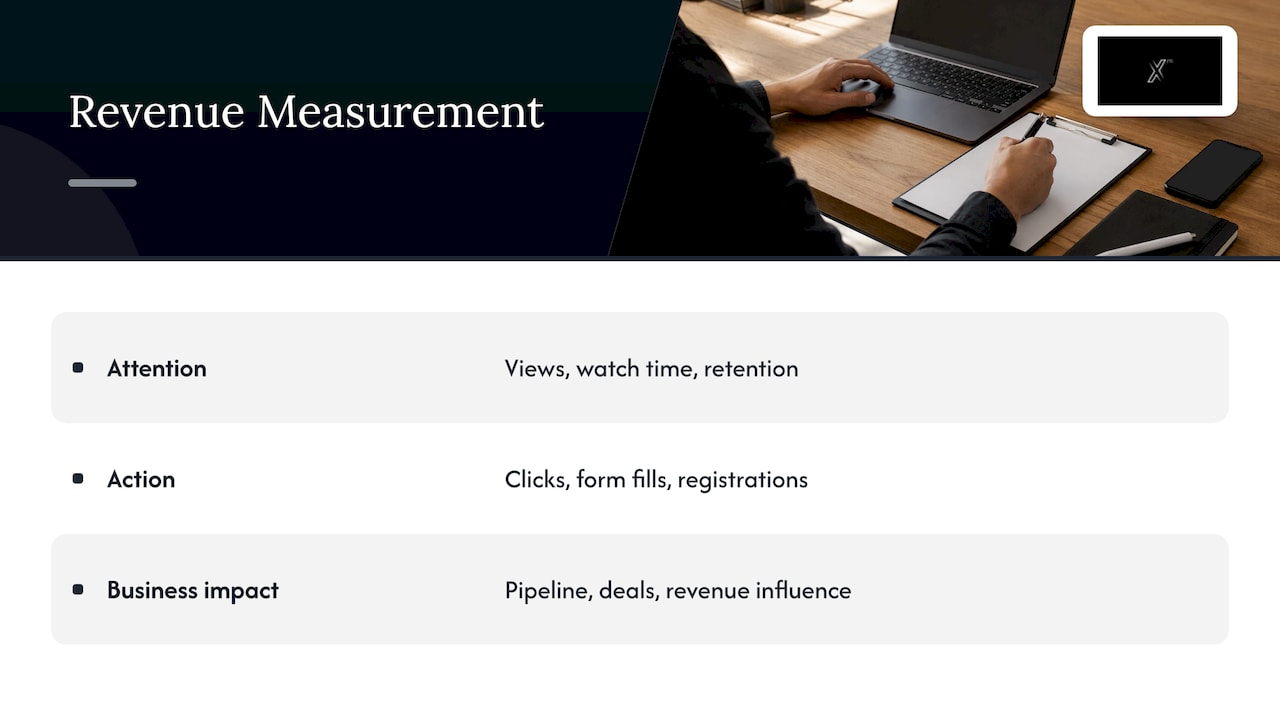
Views are easy to count and easy to misread. A better approach is to measure at three levels and read them together: attention (views, watch time, retention), action (clicks, form fills, registrations) and business impact (pipeline, deals, revenue influence).
Vimeo’s metrics guide lists view count, average view duration, audience retention, completion rate, engagement rate and click-through and conversion rate, and advises focusing on two or three that match your current goal. That is good discipline. An awareness video might be judged on reach and retention; a demo on watch depth and demo requests.
For B2B, connect your video data to your CRM. Gumlet’s guide suggests setting a watch-depth threshold, such as 75% of a demo, as a qualified-viewer signal synced to the CRM, and notes that a view you can attribute to a contact is pipeline, while one you cannot is just content. HubSpot’s team shared that tracking which videos influenced pipeline and closed deals was an eye-opener, because engagement numbers alone did not tell the full story.
Also weigh quality over volume. A few comments from operations leaders at your target accounts can be worth more than a thousand reactions from people who will never buy. And segment by placement: the same video on your homepage and on a product page can convert very differently.
A monthly review routine
- List each video published, its goal and its primary metric.
- Note which videos sales used or sent to prospects.
- Check watch depth and click-through on the call to action.
- Review pipeline influence where your CRM allows it.
- Decide: repeat, rework the first 15 seconds, change the channel, or retire.
Sharing this with leadership also protects your budget. When video is tied to leads and pipeline, it is much easier to defend. Our data and analytics service is built around exactly this kind of reporting.
A starter plan for the first 90 days
If you want a concrete path, here is a simple sequence for a B2B company starting out.
Days 1 to 30: foundation. Choose one goal. Gather buyer questions from sales, support and your analytics. Choose your main channel. Script and film a product demo and a short explainer.
Days 31 to 60: depth. Record two customer stories and one expert Q&A. Cut each into a main video and two or three short clips. Embed videos on the key service and product pages with proper watch pages and captions.
Days 61 to 90: learn and scale. Review the data. Connect video engagement to your CRM. Double down on the format that sales actually uses and that moves leads forward. Plan the next quarter’s calendar from what you learned.
This is deliberately modest. A small set of videos that each have a clear job beats a large library that nobody can measure.
Our perspective
We see the same pattern with many brands: the video gets made first and the strategy gets invented afterwards. The result is content that looks good and does little for the business.
We start the other way round. Strategy first, then creative, then execution, and then measurement that feeds the next round. That is what we mean by a 360° approach: video is one part of a connected system that includes your brand, website, social channels, paid media, email and analytics.
In practice, this means we can act as your external marketing department when you need it. We research the market and your audience, define what each video should achieve, produce the content, distribute it across the right channels and report on results. If your team wants to run video in-house, we also offer training in digital marketing.
Our advice: begin with the buyer’s questions, keep each video to one job, and connect the numbers to your sales process. Everything else is craft.
Xpert
Work with Xpert Marketing on your video strategy
If you want a partner to plan, produce and measure video as part of a wider growth plan, our team covers strategy and consulting, creative and content production (copywriting, graphic design, video, photography and podcast), digital marketing, media planning and buying, and data and analytics. You can explore the full range on our services page or see how we approach creative and content production.
Tell us your goal and your audience, and we will help you build a video plan that supports it. Start from the Xpert Marketing home page to get in touch.
FAQ
How do I start a video marketing strategy from scratch?
Begin with one business goal, such as more qualified demo requests. Collect the questions your buyers ask, then make a small set of videos that answer them, such as a demo, an explainer and a customer story. Publish on one main channel plus your website, and review results monthly.
What types of video work best for B2B?
Product demos, explainers, customer stories, expert or founder videos, how-to videos and webinars cover most B2B needs. Choose by funnel stage: explainers and short clips for awareness, demos and webinars for consideration, and customer stories and sales videos for decision.
How long should a marketing video be?
It depends on the format and the viewer’s intent. Typical working ranges are about 60 to 120 seconds for explainers, 1 to 4 minutes for customer stories and 2 to 10 minutes for demos. Webinars run 30 to 60 minutes. Keep each video as long as it needs to be to do its one job.
Which metrics matter most?
Pick two or three tied to your goal. For awareness, look at reach and retention. For lead generation, look at watch depth, click-through on the call to action and form fills. For B2B, add pipeline influence by connecting your video platform to your CRM.
How do I plan video content for a month?
List each video with the buyer question it answers, its funnel stage, channel, owner, publish date and metric. Batch the filming, plan the shorter clips during the shoot, and keep a monthly review to decide what to repeat, rework or stop.
Sources
- Adobe for Business: A full-funnel approach to video marketing strategy
- TechTarget: Create a video marketing strategy in 10 steps
- Ampere: B2B video marketing strategy
- Demio: B2B video marketing guide
- Atlassian Loom: How to build a B2B video marketing strategy
- SproutVideo: Video content distribution
- Google Search Central: Video SEO best practices
- Search Engine Land: Video SEO playbook
- Search Engine Land: How to dominate video-driven SERPs
- Vimeo: Video engagement metrics
- Gumlet: How to measure video performance
- HubSpot: Building a B2B video marketing strategy


